
I gave an agent one rule: close as many of my tickets as you honestly can, where “done” has to survive someone checking it. Two days later I had closed four tickets and opened nineteen.
I started using Claude Code in December last year. In four months, I’ve delivered what my team would have needed two or three years to ship — at least. That sounds like a happy ending. It isn’t quite.
Early 2025 AI was a toy. ChatGPT could write a function, sometimes correctly, often not. It was impressive in demos and frustrating in practice. A year later the picture is unrecognisable. AI is now genuinely useful — useful enough that I can build almost anything I want in a single day, regardless of how complex it is.
Last year I went to the Google Cloud Summit with a few colleagues. We saw a lot of impressive projects built around agents and LLMs, and walked out a bit deflated. As a data team — analysts, engineers, but not “pure” software developers — we could see the value clearly, but we’d seen this movie before: the moment we wanted to build something real, we’d be queuing up for backend developer time, or pricing out an external consultant to implement agents for us. Same bottleneck as always, just with a fancier label.
A year later, that bottleneck has quietly dissolved. We built it all ourselves — fast — with Claude Code as the agent in our IDEs. The projects we thought we’d have to outsource, we shipped on quiet afternoons.
And it isn’t just the work-shaped projects. I’m finally shipping ideas that have sat in my personal backlog for literally ten years — the kind of thing where every time you open the notebook you remember why you closed it last time. Now they’re real, deployed, and — the part I keep being surprised by — they’re solid. Tests, sensible error handling, security defaults that hold up to scrutiny. Not vibey demos. Things I’d hand to a friend without a list of caveats.
When people ask how much faster I work with the agent, my honest answer is that “faster” is the wrong axis. I built this chart for an internal talk last week to explain why.
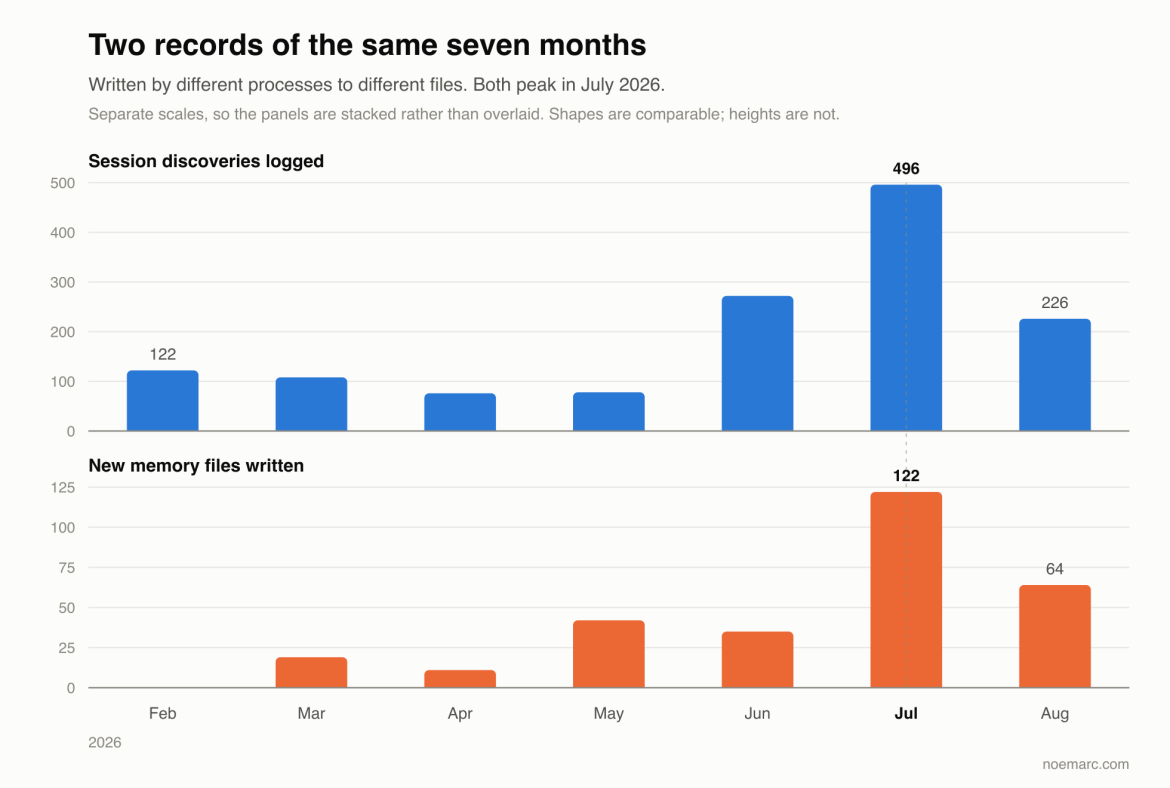
I wrote three months ago about the context files and memory system behind my AI coding agent. This post is the follow-up I wish existed back then: the concrete tricks and patterns that make the agent reliably useful, not just occasionally impressive. Most of these are small. They compound.
In Part 1 I wrote about how our AI Slack bot was confidently wrong about revenue, and how a hand-maintained corrections file fixed it. That file grew. After three months it was six hundred lines long and still did not stop the bot from producing numbers that disagreed with the dashboards. This post is about why the corrections file could never work, and the week-long migration that finally made it unnecessary.
The short version: we already had a semantic layer. That was the problem. The bot had to reconcile business logic that lived in two places at once, and no amount of prompting was going to make it good at that.
In January I mounted a Crucial P3 Plus 4TB NVMe on a Raspberry Pi 5 inside an Argon Neo 5 M.2 case and moved everything onto it — Immich photo library, motionEye camera recordings, Docker volumes, a few databases, the odd SFTP sync target. It worked. Then it froze. A week later, it froze again. Then every few days. Then every few hours.
What followed was four months of hunting a ghost. If you are running a DRAM-less NVMe (P3 Plus, WD Blue SN580, Kingston NV2/NV3, HP EX900, many others) on a Pi 5, this post is written for you.
TL;DR. The Pi 5’s firmware disables Host Memory Buffer by default; DRAM-less drives need HMB to stay alive under load. There is no fix that makes a DRAM-less drive truly stable on a Pi 5 — only mitigations (HMB on, PCIe Gen 1, throttle stack) that reduce the wedge rate without eliminating it. The Practical Checklist below is the mitigation list. The full post is the four-month version of how I got there — and why the only real answer is to replace the drive with one that has on-board DRAM.
Google Secret Manager costs money. Not much per secret, but when you run five side projects across four servers, and each has its own set of API keys, database passwords, and service tokens, the bill adds up — and so does the cognitive overhead of managing IAM permissions, service accounts, and secret versions across multiple GCP projects. So I replaced it with a private GitHub repo and age encryption.
I have been using an AI coding agent as my primary development tool for three months. Not a chatbot I paste code into, but an agent with filesystem access, shell execution, and persistent memory that works inside my terminal. It reads my codebase, runs my tests, pushes my commits, deploys my services, and remembers what it learned yesterday. This post is about the technical patterns I have developed to make that work well — the context files, the memory system, the tool integrations, and the compounding feedback loop that makes it better over time.
Newer Posts