
A from-scratch RAMSES-II receiver on the cheapest hardware that works — and the one detail that makes the signal look encrypted when it absolutely isn’t.
You can sniff and decode your Honeywell evohome / T-series heating straight off the air with a Raspberry Pi Pico and a ~€1 CC1101 radio — no nanoCUL, no ESP32, no pre-built firmware. Here’s the whole thing from scratch: the exact wiring, the working code, and the one detail that makes the signal look encrypted when it isn’t.
Spoiler: RAMSES devices put their bytes on the air as plain UART characters — start bit + 8 data bits (LSB-first) + stop bit. Miss that framing and every decoded byte is garbage that looks exactly like encryption; honour it and it’s clean plain-text. Stuck on “valid Manchester → noise” right now? Jump straight to the fix.
Every “decode RAMSES yourself” guide points you at a nanoCUL or ESP32 with someone’s firmware — no help if what you’ve got is a Pico in a drawer. So this one does it on the Pico.
New here? A 30-second orientation
This post assumes you know nothing about radios, microcontrollers or heating protocols. If any word below is unfamiliar, here’s the whole cast in plain English — nothing else here will assume you’ve met them before:
- Raspberry Pi Pico — a tiny, ~€4 programmable board (a small “computer on a chip”). It is not the bigger Raspberry Pi. A “Pico W” is the same board with Wi-Fi; the Wi-Fi is unused here, so either works.
- CC1101 — a little board with a radio chip on it. It does the actual listening and transmitting at 868 MHz.
- MicroPython — the Python programming language, running directly on the Pico. You install it once by dragging a single file onto the board (the repo README walks you through it).
- 868 MHz — a licence-free radio band (think of a very simple walkie-talkie) that Honeywell heating gear uses to talk wirelessly.
- RAMSES-II — the name of the message format those devices speak over that band. Reading it is the whole game.
- UART and Manchester — two simple, standard ways of packaging bits into bytes. I explain each as it comes up; the UART one turns out to be the entire trick.
ramses_rf/ Home Assistant — free software that already understands RAMSES-II. The end of this post shows how to feed it straight from the Pico.
That’s the whole vocabulary. If you can connect eight jumper wires and run one command in a terminal, you can do this.
What you need (the whole bill of materials)
Here’s exactly what I paid (AliExpress, after coupons + coins — real receipts, not estimates):
- A Raspberry Pi Pico — I grabbed a Pico W for $7.29 to future-proof, but its Wi-Fi is unused here, so a plain Pico (~€4) is perfectly fine.
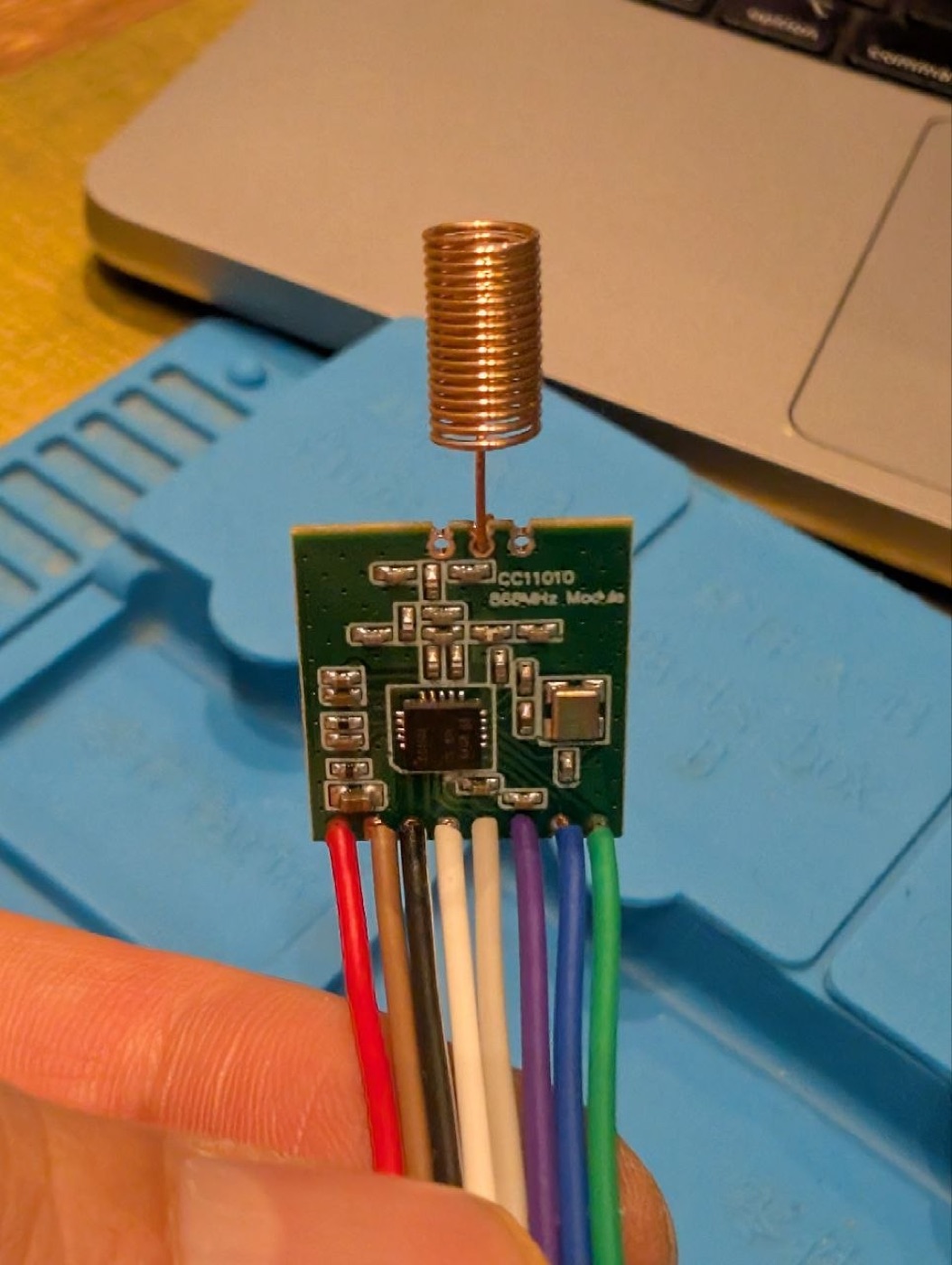
- A CC1101 868 MHz module — $1.04. Get the 868 MHz version, not 433 — they look identical but RAMSES is 868 MHz, so a 433 board simply won’t hear anything.
- A strip of 40-pin 2.54 mm male headers — $0.72 (you need eight pins on the CC1101 side).
That’s about $9 all-in, and the Pico is reusable for the next project. No nanoCUL, no ESP32, no special programmer.
One small caveat on what “ready to wire” means: most cheap Picos ship as a bare board (no headers), most cheap CC1101 modules ship with the helical antenna loose in the bag, and the eight signal pins on the CC1101 are unpopulated too. So before any jumper wire goes anywhere you’ll likely solder the Pico’s two 20-pin header strips, the CC1101’s eight-pin header, and the antenna coil to the ANT pad. None of it is hard — straight pins, generous pads — but if you’ve never held an iron, budget half an hour and a cheap €10 iron.
Software: MicroPython on the Pico, and Python (standard library only) on your laptop. Total custom code: about 200 lines — all of it on GitHub at github.com/marcdmv/pico-ramses.
What we’re talking to
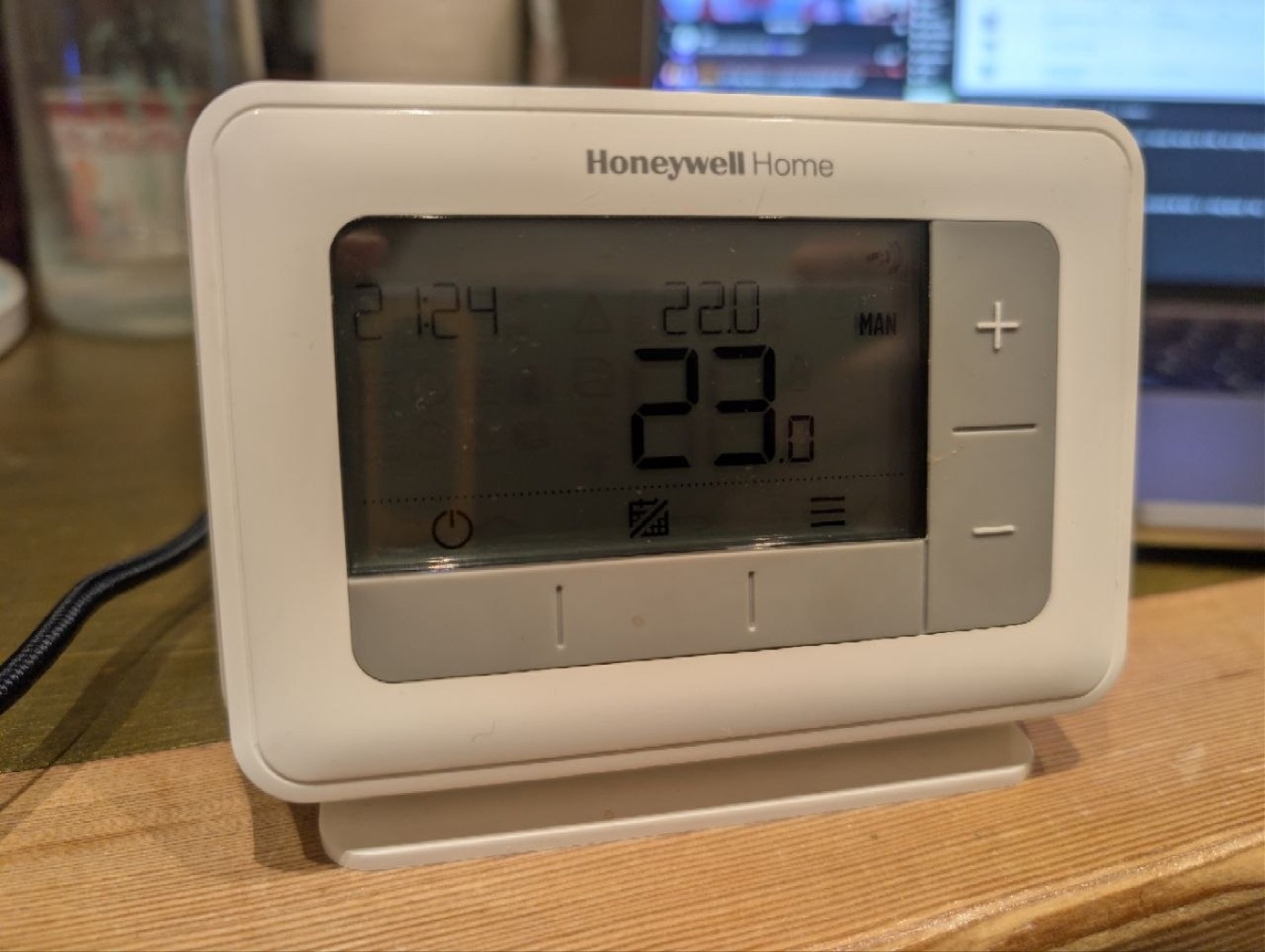
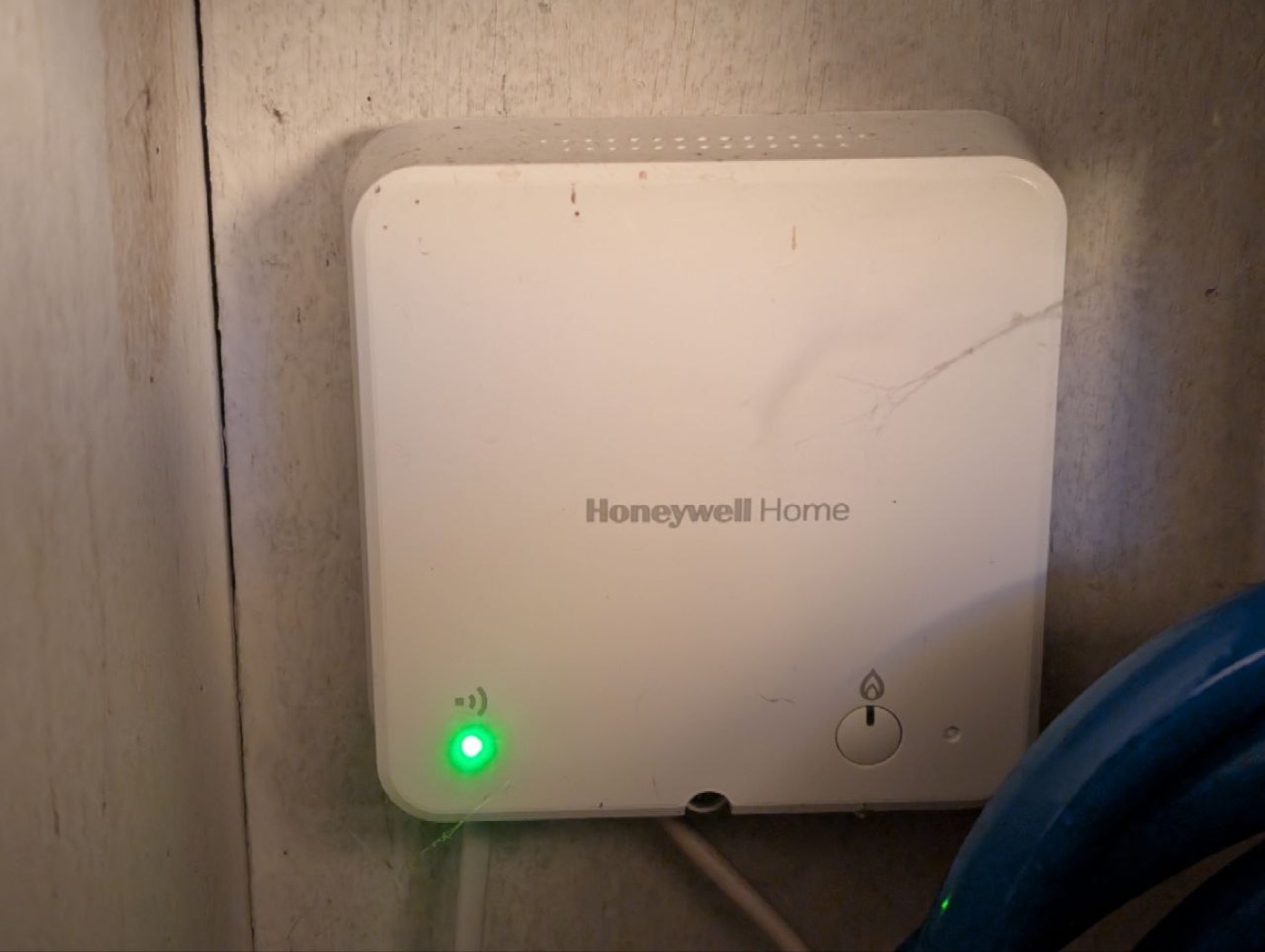
I have a Honeywell Home T4R wireless room thermostat driving an R4T relay that switches the boiler, over 868 MHz. The goal: passively log what the thermostat says (heat demand, temperature, setpoint) and eventually transmit back to control the relay.
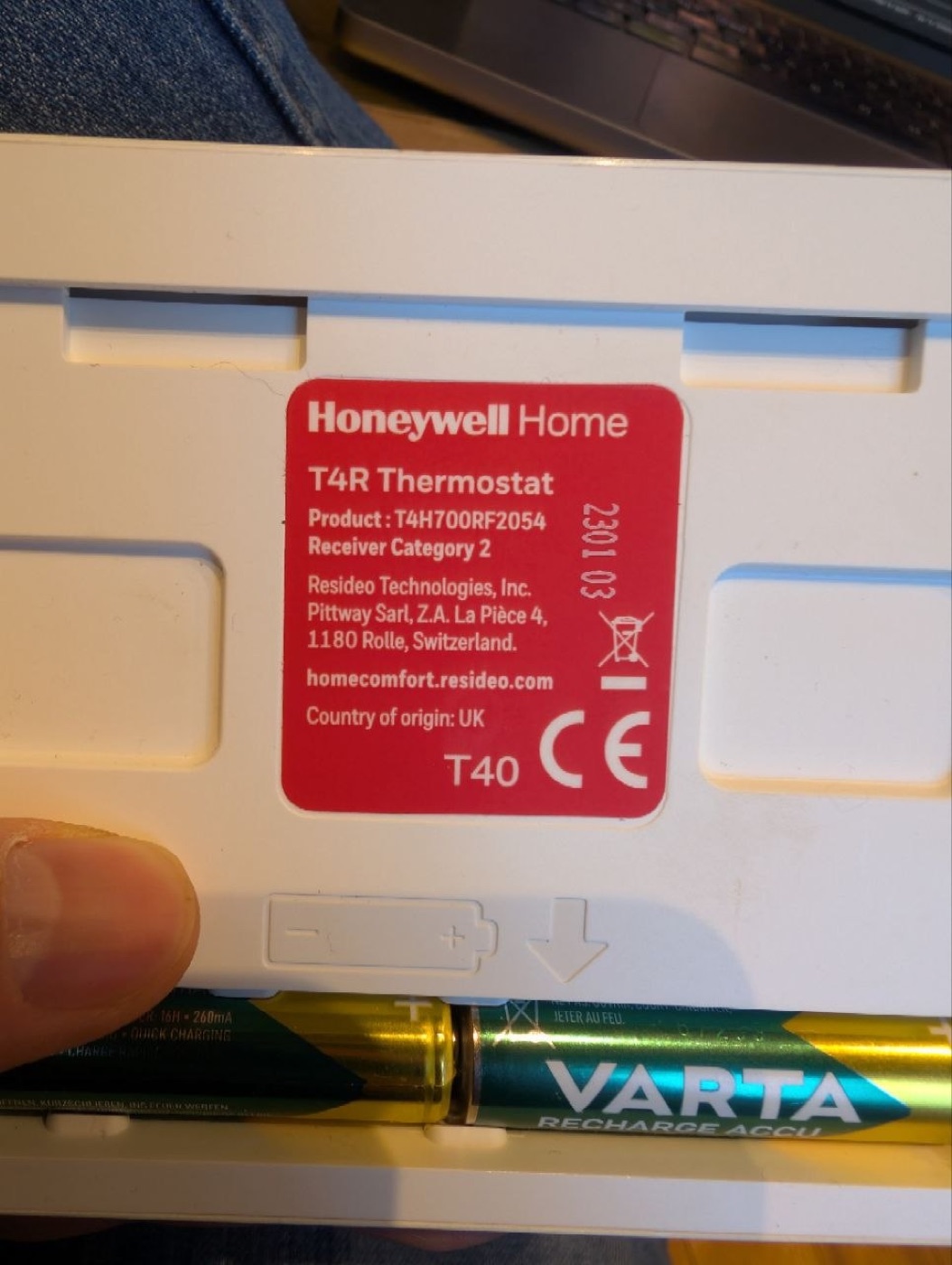
Note the room thermostat’s back label — production code 230103, i.e. early 2023. Remember that; it matters later.
RAMSES-II in 60 seconds
Honeywell’s evohome / Round / T-series kit speaks an 868 MHz protocol the community calls RAMSES-II. Every transmission looks like this on the air:
preamble (0x55 …) │ sync 0xFF 0x00 │ header 0x33 0x55 0x53 │ message (Manchester-encoded) │ trailer 0x35Modulation is GFSK at ~38.4 kbaud. The preamble, sync and header are literal bytes; the message body is Manchester-encoded. Decode the body and you get:
[header] [addr0] [addr1] [addr2] [opcode] [length] [payload…] [checksum]Each device ID is 3 bytes (TT:NNNNNN), the opcode says what the message is (temperature, heat demand, device info…), and the last byte is a checksum that makes the whole message sum to zero.
The build
New to microcontrollers? The repo’s README walks the purely mechanical setup — installing MicroPython on the Pico, installing the mpremote tool on your computer, and the wiring — step by step from a clean slate. This section focuses on the interesting radio parts; you can follow the story without doing any of it.
1. Wire it up
Before you wire anything: if the antenna is a loose coil or wire stub in the bag, solder it to the ANT pad first — without it the radio is effectively deaf and you’ll waste hours blaming your code.
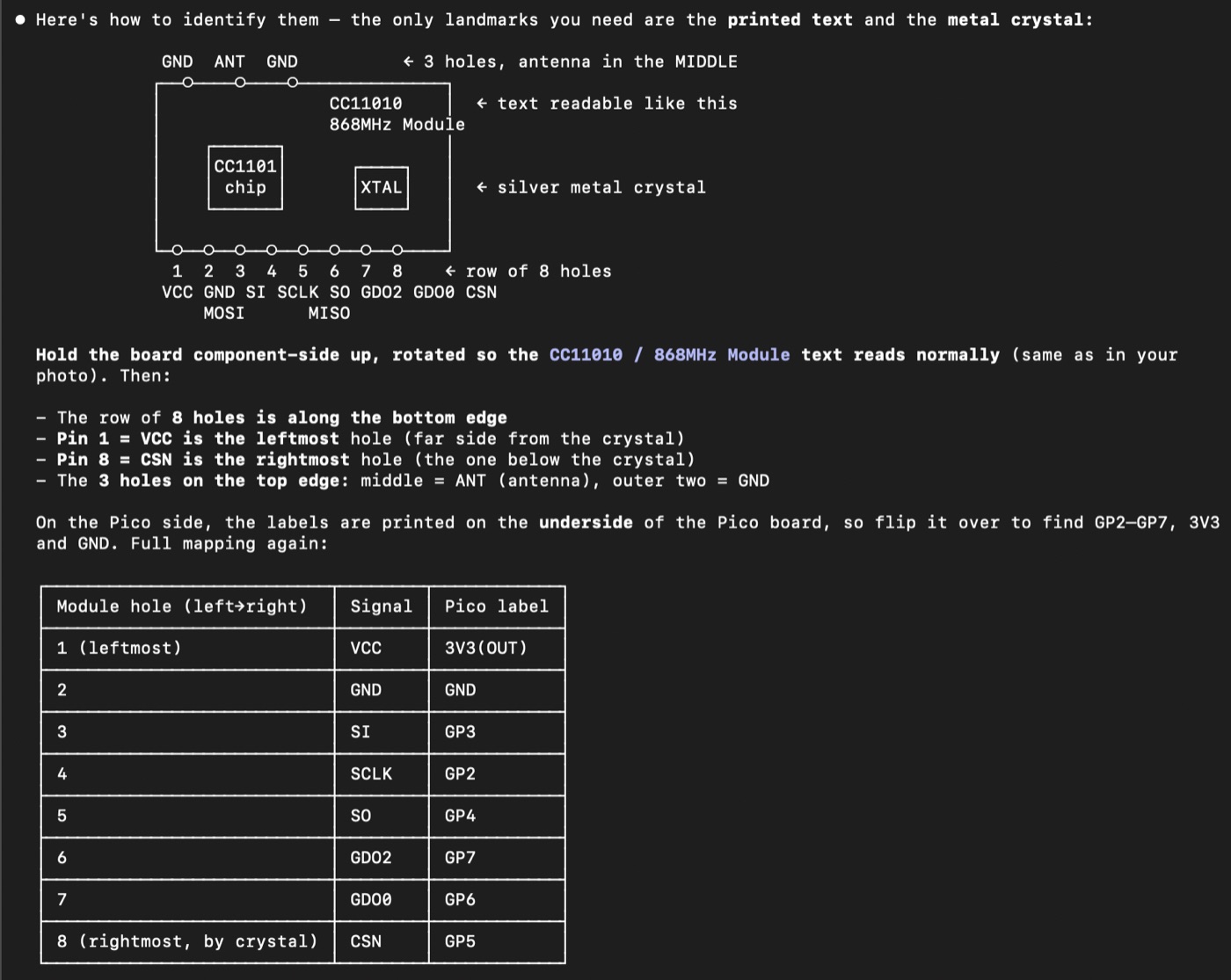
The CC1101 is 3.3 V only — power it from the Pico’s 3V3(OUT) (pin 36), never 3V3_EN (that pin disables the regulator). Then six signal lines:
| CC1101 pin | → Pico | role |
|---|---|---|
| VCC | 3V3(OUT) / pin 36 | power (3.3 V!) |
| GND | GND | ground |
| SCLK | GP2 | SPI clock |
| MOSI (SI) | GP3 | SPI out |
| MISO (SO) | GP4 | SPI in |
| CSN | GP5 | chip select |
| GDO0 | GP6 | demodulated data out |
| GDO2 | GP7 | carrier-sense gate (RSSI-triggered capture) |
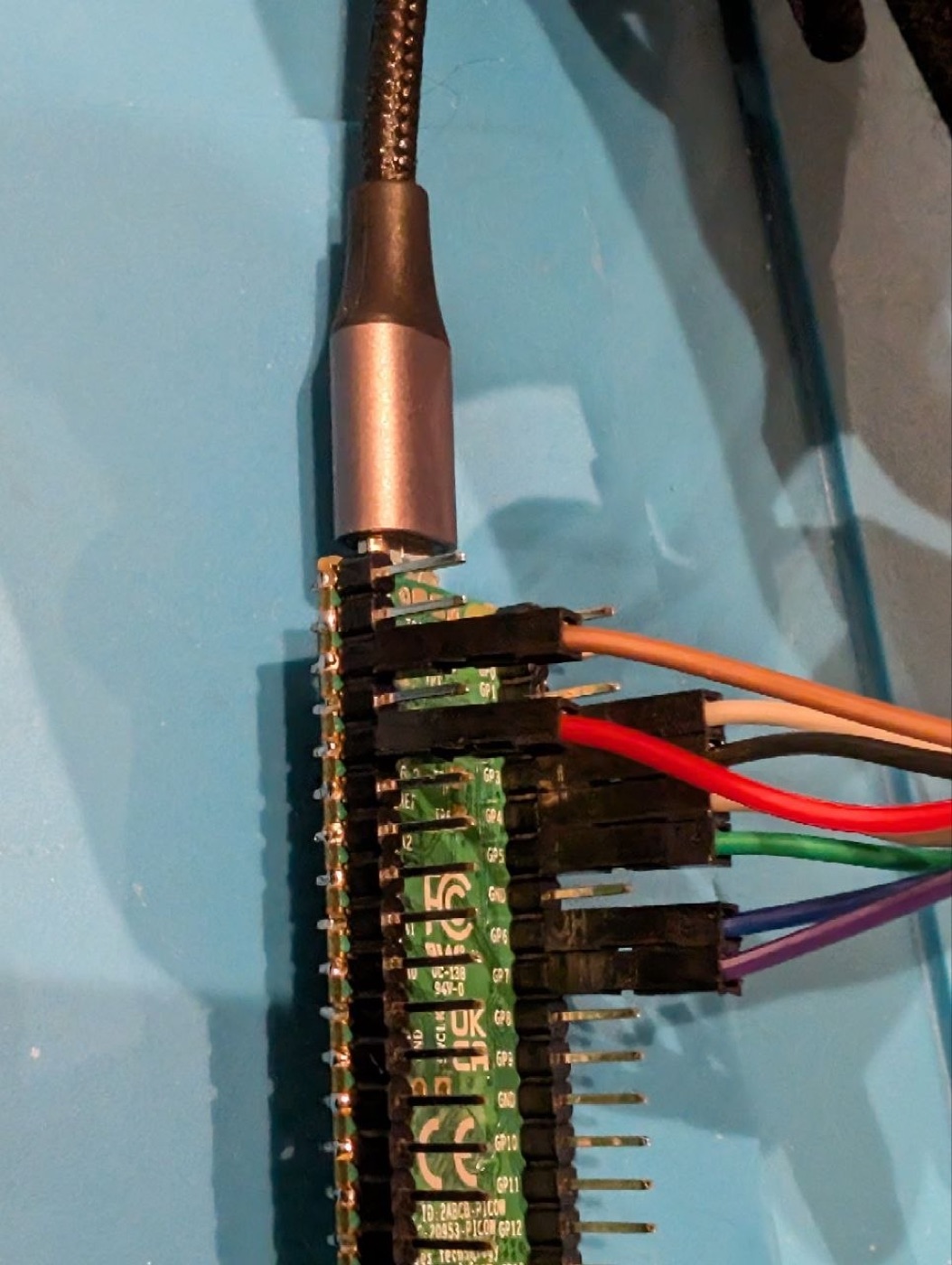
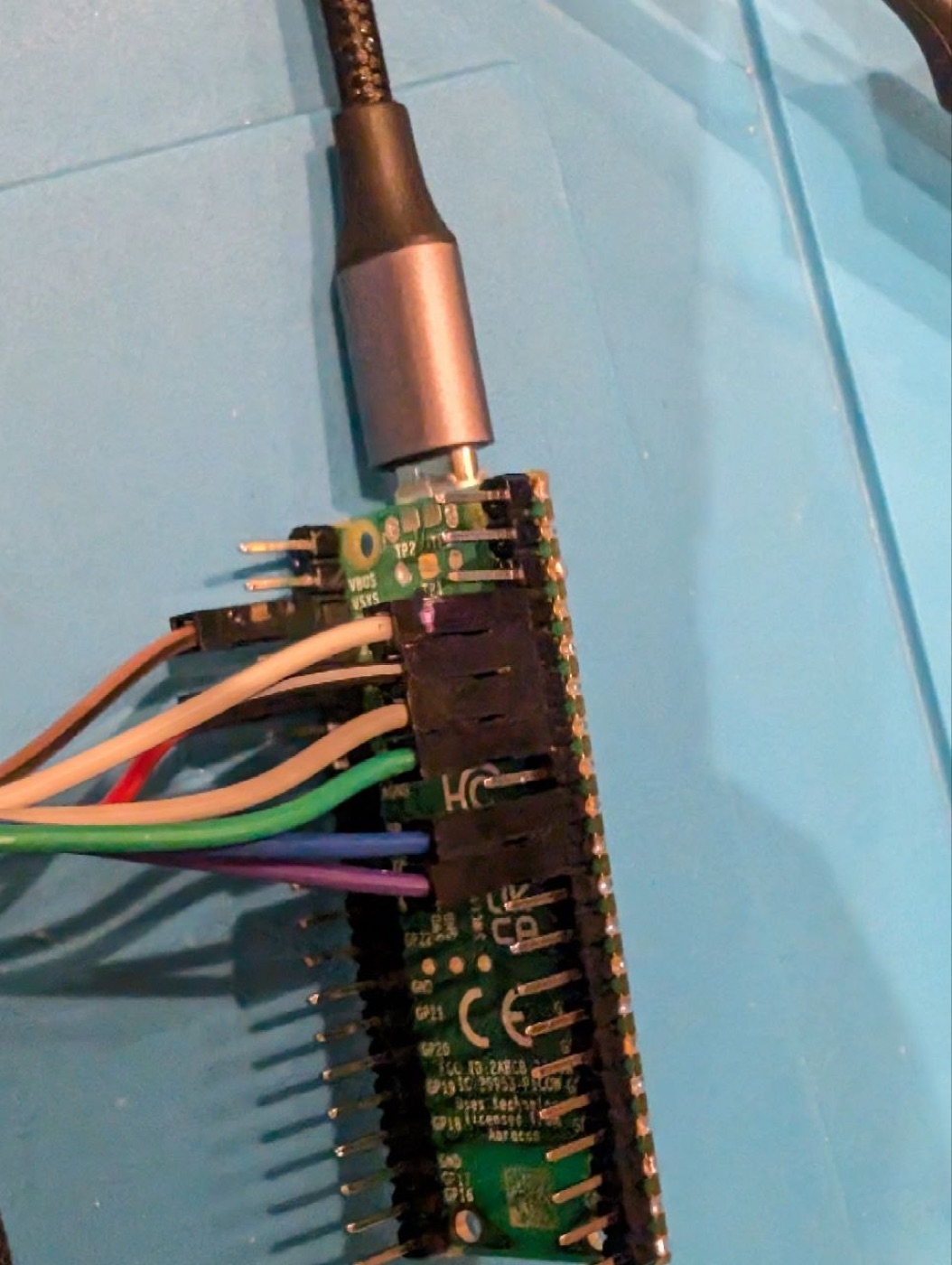
Sanity check before anything else: read register 0x30 (PARTNUM, should be 0x00) and 0x31 (VERSION, 0x14). If those come back, your SPI works and the chip is alive.
2. Hear the signal
A CC1101 is not an SDR — it listens to one narrow channel at a time. So: do an RSSI band-scan from 863–870 MHz to find where the energy is, then park on 868.3 MHz. Nudge your thermostat and you’ll see strong ~17 ms bursts at around −40 dBm. That’s your device, loud and clear.
3. Demodulate (the part that actually works on a Pico)
Two things that don’t work, so you can skip them:
- CC1101 packet mode with a sync word — the 16-bit
0xFF00sync false-triggers on noise constantly. - Bit-banging the data pin in MicroPython — at 38.4 kbaud each bit is ~26 µs; the interpreter is ~100× too slow to keep up.
What does work (and it’s what the “real” firmwares do too): put the CC1101 in asynchronous serial mode (PKTCTRL0 = 0x32, with a GDO pin set to 0x0D = “serial data out”), so the chip dumps the raw demodulated bitstream onto a pin — then let the RP2040’s PIO sample that pin at line rate. PIO handles the 26 µs timing the CPU can’t touch. This is the Pico’s superpower and the reason you don’t need a dedicated radio MCU.
Copy these exact registers rather than guessing — the IF frequency (FSCTRL1) and data-rate settings in particular:
FREQ   = 21 65 6A  (868.30 MHz)     MDMCFG4 = 6A    MDMCFG3 = 83  (~38.4 kbaud)
MDMCFG2 = 10 (GFSK, no sync)        DEVIATN = 50    FSCTRL1 = 0F
MCSM0  = 18 (auto-calibrate)        FSCAL3  = E9    FSCAL2  = 21
Captured this way, a burst is a gorgeous clean stream of pulses ~8 and ~16 samples wide. Textbook Manchester.
4. Manchester decode
RAMSES uses a 4-bit→8-bit Manchester scheme. The lookup tables (straight from the evofw3 project):
// data nibble  -> on-air byte
man_encode[16] = { AA,A9,A6,A5, 9A,99,96,95, 6A,69,66,65, 5A,59,56,55 };
// on-air nibble -> 2 data bits   (0xF = invalid, which is how you spot errors)
man_decode[16] = { F,F,F,F, F,3,2,F, F,1,0,F, F,F,F,F };
One on-air byte → 4 data bits; two on-air bytes → one message byte. Easy.
…and at this point everything looks finished. You find the 0x33 0x55 0x53 header (a clean 24-bit match — definitely RAMSES), the Manchester decodes as valid for 20-30 bytes, and the bytes are…
The trap: it looks encrypted (it isn’t)
Here is the wall that stops almost everyone, so let me be very explicit, because it cost me days.
You’ll get a header that matches, Manchester that decodes as valid, and then total garbage: no recognisable opcode anywhere, the checksum never passes, and — the killer — a payload that changes on every single transmission even when nothing in the house is changing.
That last symptom is exactly what encryption looks like, and it’s a trap. You will be tempted to conclude the payload is a rolling code or encrypted. There’s even a real rabbit hole to fall into: newer Honeywell devices (≈ mid-2025 onward) genuinely do use an encrypted RAMSES-III payload that even the reference tools can’t read — so “mine must be one of those” feels plausible.
Don’t believe it. Two things give it away:
- Check the production date on your device. RAMSES-III is recent; a unit from 2023 (like mine — that
230103code) is plain-text RAMSES-II, full stop. - The reference tools (
ramses_rf) do decode this device family — there’s even a bug report showing a Honeywell10E0message decoding to the ASCII text of the model name. If the reference can read it, it’s plain-text — and your decoder has a bug.
The “rolling, random” payload? That’s a single innocent sequence counter in an otherwise perfectly ordinary message — it ticks up by one each transmission, and the rest only looks random because it’s being sliced on the wrong byte boundaries. Which brings us to the actual fix.
The breakthrough: it’s UART-framed
I only cracked it by stopping the guesswork and reading the evofw3 firmware source — specifically how it receives bytes. It doesn’t decode the bitstream directly at all. It feeds the CC1101’s serial output into a plain UART:
8 data bits, no parity, 1 stop bit, LSB-first — a totally standard UART at ~38.4 kbaud.
That’s the whole secret. The Manchester bytes travel as UART characters — each one wrapped in a start bit (0) + 8 data bits, least-significant first + stop bit (1). The repeating 0x55 preamble is just there to let the UART lock onto the bit clock.
This changes everything about turning bits into bytes:
- Bytes are LSB-first, not MSB-first.
- Every byte carries 2 framing bits (start + stop). If you slice the raw bits into bytes 8-at-a-time without accounting for those, your byte boundary slides 2 bits per byte — and the message dissolves into “valid-Manchester-but-random” noise. The header happens to land right by luck; everything after it drifts.
That 2-bits-per-byte drift is the entire reason it looked encrypted.
The decoder that works
The whole receive path is about 30 lines of Python — read a 10-bit UART frame, find the header, Manchester-decode the rest:
MAN = (0xF,0xF,0xF,0xF, 0xF,0x3,0x2,0xF, 0xF,0x1,0x0,0xF, 0xF,0xF,0xF,0xF)

def frame(bits, p):                 # one UART char: skip start, take 8 data bits LSB-first
    return None if p+9 > len(bits) else sum(bits[p+1+k] << k for k in range(8))

def decode(bits):
    for p in range(len(bits)-30):                       # find 33 55 53 as three UART chars
        if frame(bits,p)==0x33 and frame(bits,p+10)==0x55 and frame(bits,p+20)==0x53:
            msg, acc, half, q = bytearray(), 0, 0, p+30
            while q+10 <= len(bits):
                fb = frame(bits, q); q += 10
                if fb is None or fb == 0x35:             # trailer = end of message
                    break
                lo, hi = MAN[fb & 0xF], MAN[(fb>>4) & 0xF]
                if lo == 0xF or hi == 0xF:               # invalid Manchester
                    break
                acc = ((acc << 4) | (hi << 2 | lo)) & 0xFF
                half ^= 1
                if not half:                             # two UART chars = one message byte
                    msg.append(acc)
            return bytes(msg)
bits is the demodulated stream (one bit per ~8 samples). That’s it. Feed it the burst and out come clean RAMSES messages.
It works
Live, from my own thermostat (device IDs anonymised):
 I  31:xxxxxx --:------ NUL:262142   10E0 (device_info)   checksum ✓
     payload, as ASCII:  "Jasper Stat TXXX"          ← the model name, in clear text

 I  31:xxxxxx --:------ 08:yyyyyy    0008 (relay_demand)  ← the heat demand to the relay
 RQ 31:xxxxxx --:------ 08:yyyyyy    1FC9 (rf_bind)
     … plus 30C9 temperature, 2309 setpoint, 3EF1 actuator-cycle …
The 10E0 device-info message checksums perfectly and literally spells out the device model. That’s proof the decode is correct and the traffic is plain RAMSES-II — exactly as the reference tools see it.
I also built a little live web tool so you don’t iterate over a laggy serial link: the Pico streams bursts continuously over USB, a stdlib-only Python server decodes them, and a browser page shows a live feed — verb, source→destination devices, opcode, payload, checksum. No installs.
All of it is on GitHub — github.com/marcdmv/pico-ramses. The Pico firmware, the decoder + live web UI, a standalone reference decoder, and the (experimental) transmit encoder. Clone it, wire up a Pico and a CC1101, run ./start.sh, and you’re sniffing your own heating in a couple of minutes.
Gotchas, so you don’t repeat mine
- The bytes are UART characters. Start + 8 data LSB-first + stop. This is the one that gets everyone. If your decode is “valid Manchester → garbage,” this is almost certainly why.
- A payload that changes every transmission is not proof of encryption. It’s also exactly what a 2-bit framing drift produces. Rule out framing before you theorise about crypto.
- Trust the reference. If
ramses_rf/evofw3decode your device family, the traffic is plain-text — the bug is yours. Read their source (theuart.candframe.cfiles) instead of guessing register configs and conventions for days. - A Pico is genuinely enough to receive. Async mode + PIO sampling captures RAMSES cleanly. You only need a nanoCUL/ESP32 to reuse pre-built firmware — not to do the job.
- Check the production date before blaming encryption. RAMSES-III (encrypted) is real, but only on recent (~mid-2025+) hardware.
- Not every frame obeys the sum-to-zero checksum — and that’s fine. The broadcast frames (like
10E0) checksum perfectly and even spell out the device model in ASCII. But the thermostat→relay frames here carry a header with bit 7 set (0x9C/0x8C, well outside the canonical0x00–0x3Crange) and an opaque, changing payload, and they land a constant +1 off the checksum. I chased this for a while before realising a stockevofw3receiver sums the raw on-air bytes the exact same way (message.c,msgRx->csum += byte) — so it would flag these identically. It’s a property of Honeywell’s proprietary relay frames, not a decode bug. The verb, device IDs, opcode and rolling counter all read out fine; only that proprietary payload (and its checksum) stays opaque — and, as the update below shows, the reference tool can’t read it either, so it isn’t a gap in your decoder. Don’t burn a day “fixing” it.
Where this goes next
The whole point of doing this on a Pico is accessibility: it’s the board people already own, the CC1101 is pocket change, and you don’t have to source a specific “supported” radio stick. The catch was that the mature firmware (evofw3, ramses_esp) only targeted ATmega328 and ESP32-S3 — there was no RP2040/Pico port, so you couldn’t just plug a Pico into Home Assistant.
So I wrote one. evofw3_pico.py turns the Pico into a USB gateway that speaks the exact evofw3 line format — which makes it a drop-in for ramses_rf and the Home Assistant “evohome (RAMSES RF)” integration, with all the decoding running on the Pico itself. It’s live and verified on real hardware: copy it to the Pico, point Home Assistant at the Pico’s serial port, and your heating shows up. The receive half of the port is done — here’s a real decoded line straight off the gateway:
028 RQ --- 31:xxxxxx 08:yyyyyy --:------ 3EF1 012 002A0095CAD0D4ECC72E4C55The other half is transmit — to actually control the relay. That same gateway file already contains the encoder (it’s just the receive pipeline in reverse: build message → Manchester-encode → wrap each byte as a UART character → push to the CC1101’s TX FIFO), and it round-trips correctly in the tests. The one thing a single radio can’t cleanly confirm is that the signal actually went out over the air — because the R4T relay is receive-only and never replies — so on-air confirmation is the remaining follow-up, ideally with a second cheap CC1101 as a witness.
Update: can you actually control the relay?
Short version: yes for a standard relay, not (yet) for mine — and the distinction is worth knowing before you buy hardware to automate your heating.
RAMSES-II has no cryptographic authentication, so in principle you switch a boiler relay by impersonating the controller and sending it a 0008 relay_demand: two cleartext bytes, 00C8 for full demand (on) or 0000 for off. ramses_rf does exactly that, and you can read its command builder yourself:
def put_actuator_cycle(... src_id ...):     # builds a 3EF1
    if src_id[:2] != DEV_TYPE_MAP.BDR:      # BDR = a standard BDR91 relay
        raise CommandInvalid("device_id should be like BDR:xxxxxx")
    payload = "00" + cycle + countdown + modulation% + "FF"   # cleartext, structured
Note the guard: it refuses to build the frame for any device that isn’t a BDR91. My relay decodes as device type 08, which ramses_rf calls a JIM — a Honeywell “Jasper” interface module (the thermostat is a matching JST, “Jasper Stat” — that’s the Jasper Stat TXXX string we pulled out of the 10E0 earlier). And for that Jasper family, ramses_rf’s own parser doesn’t decode the demand at all — it hands the payload straight back as an opaque {ordinal, blob}: a plain incrementing counter, and a blob whose format nobody has published. So the opaque relay payload from the gotchas above isn’t a hole in my decoder — the reference implementation treats it identically.
That rules out the obvious plan — synthesising an on/off frame from spec — for Jasper kit specifically. Two things still work, though:
- You can log heat demand without decoding the blob at all. When the thermostat is calling for heat it emits
0008frames every few seconds; when the house is satisfied it goes near-silent — one heartbeat every few minutes. The presence of0008traffic is the demand signal, which is enough to chart exactly when your boiler runs. - Replay might still flip it. With no authentication in the protocol, retransmitting a captured real on-frame verbatim could be enough to fire the relay — provided it doesn’t reject the now-stale counter. That’s the next experiment; I’ll update this post with the result.
If your relay is an ordinary BDR91, none of this bites — you’re in cleartext territory and full control is a few lines away. The Jasper variant is the one that fights back.
If you’re attempting any of this on a Pico, I hope this saved you the week it nearly cost me. The single thing to tattoo on your forehead: it’s UART-framed.
Hardware: Raspberry Pi Pico + CC1101 868 MHz (~€8 / $9 total). Software: MicroPython + Python stdlib, ~200 lines. Huge credit to the evofw3 and ramses_rf projects for the protocol groundwork — this post stands entirely on theirs.
